Pink Poogle Toy Forum

The official community of Pink Poogle Toy. Bear with me while I tweak everything
It is currently Wed Sep 16, 2026 11:28 am

All times are UTC


Post new topic  This topic is locked, you cannot edit posts or make further replies.  [ 5 posts ] 
Author Message
 Post subject: Help with 2 questions
PostPosted: Sun Nov 12, 2006 5:30 pm 
Honorary Member
Honorary Member
Offline

Posts: 6812
Joined: Mon Nov 22, 2004 2:02 pm
Website: http://werewolfgames.freeforums.org/
Location: Watching little birds fly kamikaze missions into the walls.
I have 2 questions, unrelated to eachother except for the fact that both questions use Adobe Photoshop 7.

1. When I create a new canvas to work with, I get a "01" in the upper left corner along with a tiny little graphic, and I can't for the life of me remember how to get rid of it. It's difficult to place text when that is in the way. Here's a screenie of what I'm talking about:

Image

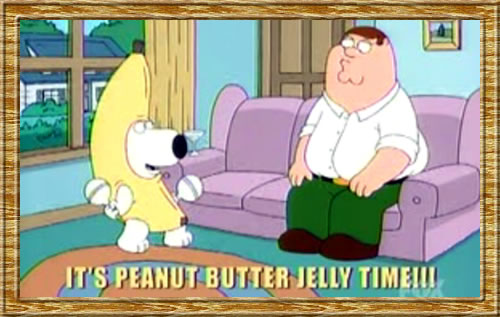
2. What is the best way to cut out images? If I have the image below, and I just want Brian (the dog), how would you cut him out of the image?

Image example:

Image

Thanks for any and all help!

_________________
Image
It was an honor serving you PPT. I will miss you.
Click here to join my new werewolf forum!


Top
 
   
 Post subject:
PostPosted: Sun Nov 12, 2006 5:47 pm 
Honorary Member
Honorary Member
Offline

Posts: 4587
Joined: Mon May 31, 2004 6:33 am
Location: Being PWNED
If I had to cut out brian, i'd probably lasoo around him and then erase the edges of the image down to make it a clean cut. But since i'm not a photoshop god like some people here, there might be an easier way.

_________________
Image
Evisceration is a sign of respect.


Top
 
   
 Post subject:
PostPosted: Sun Nov 12, 2006 7:24 pm 
Administrator
Administrator
User avatar
Offline

Posts: 7245
Joined: Mon May 31, 2004 3:56 am
ICQ: 69920079
Website: https://pinkpt.com/
Yahoo Messenger: khuynh777@yahoo.com
Location: Faster than a speeding IM! Stronger than an ox on steroids! Pinker than a bottle of Pepto-Bismol!
To get rid of the H1, hold Control and press H :)

_________________
Image


Top
 
   
 Post subject:
PostPosted: Mon Nov 13, 2006 11:55 am 
PPT Trainee
PPT Trainee
Offline

Posts: 657
Joined: Tue Jun 01, 2004 4:35 am
ICQ: 51537940
Website: http://www.krumpit.org
Location: Australia
1. Hehe, I've had problems with this one too. "01" is a slice number. To get rid of it quickly you can press Ctrl+H. But that will just hide it temporarily, so a better way is to go to "View" > "Show" and then unselect "Slices" (I think).

2. I tend to use "layer masks" to get rid of image backgrounds. It's a bit complicated to understand at first, but once you do, it is the easiest way! It means you can "paint" out the bits of the image that you don't want using almost whatever tool you want (brush, lasso + brush, pen tool, etc), and can let you do all kinds of spiffy effects.

Um, after doing a quick google search for "photoshop layer mask tutorial", this one seems pretty good: http://www.lunacore.com/photoshop/tutorials/tut003.htm

You can probably skip to the second half if you want, that really shows masks in action, which is the best way of explaining them :)

_________________
Image
Nyum nyum nyum...


Top
 
   
 Post subject:
PostPosted: Mon Nov 13, 2006 11:57 am 
Honorary Member
Honorary Member
Offline

Posts: 4363
Joined: Tue Jul 13, 2004 2:40 am
Location: Down Under
i agree with masking - although i use psp. you can always change your mind if you're masking, you dont have to worry about deleting part of the image you want to keep by accident.


Top
 
   
Display posts from previous:  Sort by  
Post new topic  This topic is locked, you cannot edit posts or make further replies.  [ 5 posts ] 

All times are UTC


You cannot post new topics in this forum
You cannot reply to topics in this forum
You cannot edit your posts in this forum
You cannot delete your posts in this forum

Search for:
Jump to:  
Powered by phpBB® Forum Software © phpBB Limited