Shenkuu Lunar Temple Guide
Written by Mary Sutherland
Here are two guides to a Neopets Daily that doesn't seem to be all that
well-known; it's hardly ever listed in game guide collections. The mathematical
solution, explained first, is for those who like to add an extra bit of logic
and fun into their solving. The non-mathematical solution is the quick, no-fuss
way to get your answer without the use of a calculator!
Shenkuu Lunar Temple
http://www.neopets.com/
The Mathematical Solution
On the puzzle page, view the page's source.
For Firefox: Right-click anywhere on the page, and select "View Page Source"
For Internet Explorer: Click View in your toolbar, and select Source from the
dropdown menu
In the page source window, open your word finder by pressing Cntrl+F, and search
the code for the word Kreludor
The word will be highlighted, part of a link address, the end of which looks
like this:
Kreludor=204&viewID=2&lang=en
The only thing you need to worry about in the code you find is the blue number
in the above example.
*Note: The number in blue will be different in each source (it's random, and
changes daily)*
Put the number into a calculator, and do one of the following:
If your number is under 180, add 202.5
If your number is above 180, subtract 157.5
Take the sum that you get from the previous step and divide it by 22.5
Round the number you get either up or down, depending on the number that follows
the decimal. For example, if your total is 9.6, your final number would be 10.
If your total is 4.3, your final number is 4.
*Note: A 5 after the decimal calls for a rounding UP. For example, if your
total is 6.5, your final number is 7.
Special note: If your total is 16.5 or above, your final number is 1
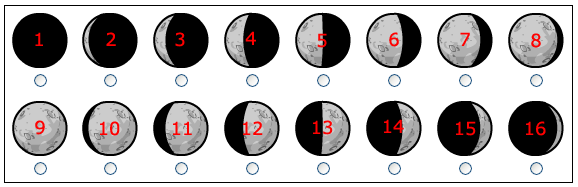
Your final number will correspond with one of the moons in the chart that you
choose from, as follows:
The Non-Mathematical Solution
On the puzzle page, view the page's source.
For Firefox: Right-click anywhere on the page, and select "View Page Source"
For Internet Explorer: Click View in your toolbar, and select Source from the
dropdown menu
In the page source window, open your word finder by pressing Cntrl+F, and search
the code for the word Kreludor
The word will be highlighted, part of a link address, the end of which looks
like this:
Kreludor=204&viewID=2&lang=en
The only thing you need to worry about in the code you find is the blue number
in the above example.
*Note: The number in blue will be different in each source (it's random, and
changes daily)*
Using this chart, match up your source code number, and find the corresponding
moon number:
0 - 11.24 = 9
11.25 - 33.74 = 10
33.75 - 56.24 = 11
56.25 - 78.74 = 12
78.75 - 101.24 = 13
101.25 - 123.74 = 14
123.75 - 146.24 = 15
146.25 - 168.74 = 16
168.75 - 191.24 = 1
191.25 - 213.74 = 2
213.75 - 236.24 = 3
236.25 - 258.74 = 4
258.75 - 281.24 = 5
281.25 - 303.74 = 6
303.75 - 326.24 = 7
326.25 - 348.74 = 8
348.75 - 360 = 9
Each moon number corresponds with a phase of the moon, pictured here:
That's it!















Neopets Departments